
In This Story
Countdown timers are a widely misunderstood conversion tool in eCommerce. Some brands treat them like cheap tricks to force more sales. While others avoid them completely, because they think every timer is dishonest. Neither view is correct. Timers are not inherently good or bad. They are just a tool, and the result depends entirely on how we choose to use them.
The timer itself is not the problem. The way most brands use it is the real problem. We have studied how countdown timers perform on product pages, on cart pages, and in emails for many online stores. The pattern is always the same. Timers perform well when they are real, meaningful, helpful, and placed where the customer is already ready to buy. But when timers are fake or when we use them too aggressively, you stop trusting the store, and that damage shows up later in the brand’s reputation.
This post explains how we actually use countdown timers, where they work, where they do not, and the strict rules we follow before we show them to you.
Why Most Countdown Timers Fail
Most countdown timers do not work because you do not design them to help you. Most design them only to create pressure without giving you any context. A timer alone does nothing. Simply watching the time count down will not make you act unless you truly believe something meaningful will happen when the time runs out.
Usually, timers just sit on websites and mobile screens. They tick down, but they do not communicate consequences. You see them, you ignore them, and then you move on. Over time, they become background noise.
The real issue is not that the timers exist, but that they are boring and meaningless. When nothing changes at zero, you stop caring. When the timer just resets, you learn you cannot trust it. Therefore, when urgency has no real reason, it stops working entirely.
You need a reason to feel urgency. You must understand what you gain by acting now or what you lose by waiting. Without that clarity, the timers feel empty and manipulative, too. This is why so many countdown timers fail. Brands treat them as decoration instead of treating them as decision tools. They do not communicate value, consequences, or relevance. They just sit there.
We have reviewed stores where timers were everywhere: on product pages, in headers, in footers, and in popups. Well, the conversion rates did not increase, and in some cases, they actually dropped. The reason is very simple. Urgency was introduced way too early and strongly. It should support a decision you are already considering, not force a decision you are not ready to make.
The Real Psychology Behind Urgency
This is not about scaring you or manipulating you. Buyers do not dislike urgency. What they dislike is feeling tricked.
Urgency works when the value is clear, the limitation is real, and the deadlines make real sense. When you meet these conditions perfectly, works.
Good urgency reduces your indecision. Bad urgency creates stress. When urgency makes you anxious, we lose more than a sale. They lose your trust, and that is very hard to rebuild. Urgency is a lever. It changes how you feel about our brand, not just whether you click a button.
The Only Countdown Timers We Actually Use
We do not use every type of countdown timer available. Only the ones that serve a real purpose make it into production.
We use shipping cutoff timers that tie directly to fulfillment deadlines. These help you know when you must order to receive a product by a certain date. We use limited-time pricing or bundle timers only when the pricing or availability is truly restricted.
We also use cart reservation timers to protect inventory or pricing, timers for free shipping or bonuses that are about to expire, and timers for launches or product drops. But in most cases, we prefer to use urgency in email, instead of filling the website with too many messages.
If a timer does not connect to the inventory, fulfillment, pricing, or real operations, do not use it. Every timer must show you real impact or data.
Where Countdown Timers Actually Work
4.1 Product Page (PDP) Countdown Timers

Product detail page timers are high risk. They only work in very specific situations, like real shipping deadlines, flash bundles, or inventory-backed offers. If the offer does not need urgency, the timer makes you look desperate.
Placement and user experience matter a lot, too. For example, the timer should never fight with the main call to action. Placing it inline usually works better than a sticky timer. The mobile experience is absolutely crucial. If the timer does not work perfectly on your phone, it does not matter how it looks on the screen.
Language and tone also play a big role here. For example, content like “Order in the next X hours to receive by” or “Price increases in” works a lot better than vague phrases like “Offer ends in.” The timer must explain what actually changes for the customer and what value it provides for them.
4.2 Cart Page Countdown Timers

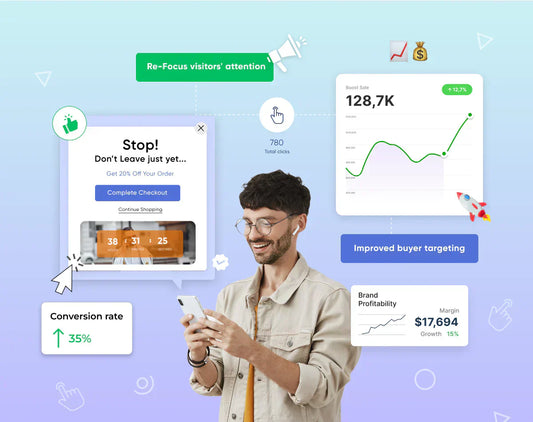
The cart pages are where we see timers perform their best. Here, users already have a high buying intent. The urgency here is not about persuasion; it is about keeping your momentum.
Cart timers help reduce your procrastination and keep you moving toward checkout. We use them for cart reservations, free shipping expirations, and expiring bonuses.
Design is critical here, too. Timers must not slow down your checkout or create friction. They should be easy to read, visually calm, and quick to understand. Also , note that subtle movements perform a lot better than aggressive animations. You need to make sure to remove anything that confuses the buyer.
4.3 Email Countdown Timers

Email is a better place for creating a sense of urgency than a website. This is because timers on websites can be really annoying. Email timers work well and do not feel like they are bothering you.
Use timers for things like abandoned cart flows, last-chance reminders, and product launches because these are the times when people really need to be reminded to do something.
If we look at email timers, GIF timers are okay, but Dynamic timers are a lot better. They give you accurate results. The thing is, it does not matter what kind of timer you use. The main thing is that the timer has to work. Deliverability is the important thin,g so the timer must actually work to be any good. Dynamic timers and GIF timers both need to be able to deliver.
When it comes to subject line,s they should tell the person that they need to do something right away. A good subject line is one that says something like "you need to do this" without looking like junk or spam mail.
Urgency Is a Lever, Not a Crutch
Countdown timers cannot fix a weak offer or an unclear value proposition. When used the right way, they remove friction and encourage confident user actions. When used incorrectly and without any strategy, they expose internal weaknesses and destroy user trust.
Implementing dynamic timers and personalized urgency is a delicate balance. If this sounds like too much to manage on your own, Nivara is here to help you implement these strategies effectively without risking your customer trust.